Google Translate is one of the most popular and widely used translation tools in the world. From simple word translations to full document conversion, voice input, and real-time conversations, Google Translate has transformed how people communicate across languages. Whether you’re translating English to Hindi, Spanish to English, or Chinese to English, this tool makes language barriers easier to overcome.
What Is Google Translate?
Google Translate is a free multilingual translation service developed by Google. It allows users to translate text, speech, images, websites, documents, and even handwritten content from one language to another. It supports hundreds of languages, including major ones like English, Spanish, French, German, Chinese, Arabic, Hindi, Tamil, Japanese, Korean, Italian, Portuguese, and Dutch.
Who Invented Google Translate?
Google Translate was launched by Google in April 2006. It was created by Google engineers using statistical machine translation, which later evolved into neural machine translation (NMT). This upgrade significantly improved translation accuracy, grammar, and sentence flow.
How Google Translate Works
Google Translate uses artificial intelligence and machine learning to analyze millions of bilingual texts. Instead of translating word by word, it understands sentence structure and context, making translations more natural.
Google Translate Features Explained
Text Translation
This is the most common feature. You can translate short phrases or long paragraphs between languages such as:
- English to Spanish
- Hindi to English
- English to French
- English to German
- Chinese to English
- English to Italian
Voice Translation (Speak Feature)
Google Translate allows you to speak into your device and instantly translate spoken words. This feature is helpful for:
- Learning pronunciation
- Real-time conversations
- Travel and tourism
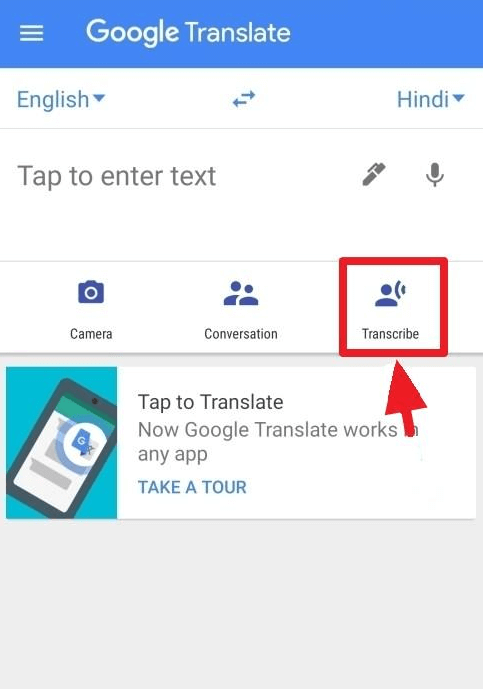


Voice-to-Text Translation
You can convert spoken language into written translated text. For example:
- English to Spanish voice
- English to Hindi voice
- Mandarin to English
This feature is especially useful for interviews, meetings, and quick translations.
Camera & Image Translation
Using your phone camera, Google Translate can instantly translate:
- Signboards
- Menus
- Printed documents
Just point your camera, and the translated text appears on the screen.
Document & PDF Translation
Google Translate supports document uploads such as PDF, Word, and text files. You can translate:
- English to Hindi PDF
- Spanish to English documents
- French to English reports
Popular Language Translations on Google Translate
English-Based Translations
- English to Hindi
- English to Spanish
- English to French
- English to German
- English to Chinese (Simplified)
- English to Japanese
- English to Korean
- English to Arabic
- English to Tamil
- English to Portuguese
Non-English Translations
- Spanish to English
- French to English
- German to English
- Chinese to English
- Italian to English
- Dutch to English
- Swedish to English
Google Translate App vs Website
Google Translate App
- Available on Android and iOS
- Offline translation support
- Camera and voice features
- Conversation mode
Google Translate Website
- Best for long text and document translation
- Easy to use on desktop
- Supports website translation
You can access it via www.googletranslate.com.
Google Translate vs Duolingo
Google Translate
- Instant translation
- Best for quick understanding
- Supports documents, voice, and images
Duolingo
- Designed for learning languages
- Structured lessons and exercises
- Not ideal for instant translation
Both tools serve different purposes and can be used together effectively.
New Languages and Updates in Google Translate
Google frequently adds new languages and improves accuracy using AI. Updates include:
- Better sentence structure
- Improved voice recognition
- More accurate regional dialect translations
Is Google Translate Accurate?
Google Translate is highly accurate for common languages and everyday use. However:
- Technical or legal documents may need professional translation
- Idioms and cultural phrases may not always translate perfectly
It’s best used as a support tool, not a replacement for human translators in critical scenarios.
How to Use Google Translate for Learning Languages
You can use Google Translate to:
- Learn pronunciation
- Understand sentence structure
- Practice speaking using the voice feature
- Translate lessons while studying Spanish, French, German, or Japanese
Conclusion
Google Translate has become an essential tool for global communication. With features like text translation, voice input, camera translation, document uploads, and support for hundreds of languages, it serves students, travelers, professionals, and language learners alike. While it may not replace professional translators, Google Translate remains one of the most powerful, accessible, and evolving translation tools available today.
Read More: Character AI: What It Is, What’s Happening, and Is It Shutting Down?